


FaxFile - Send Fax from phone
4.96.16K Reviews
App Specs
- Version
- Varies with Device
- Updated On
- License
- Free
- Downloads
- 500,000+
- Developer
- Actual Software Inc.
- Categories
- Business
- Platform
- Android
Screenshots


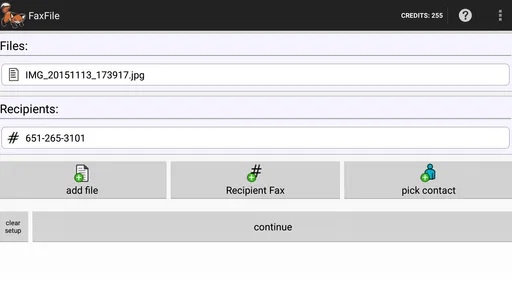
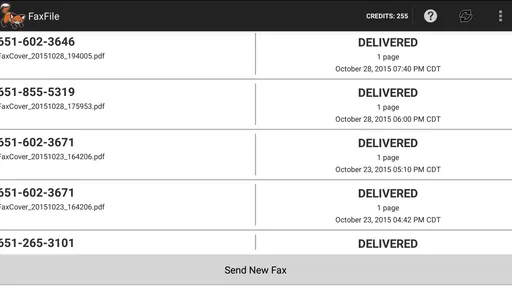
 Analysis by AppCompare
Faxing from a phone sounds like an odd throwback until a form, signed page, or business document has to reach an organization that still expects a fax. I see FaxFile - Send Fax from phone as a practical answer to that specific problem: it gives Android users a way to send documents without finding a physical machine. It is not a replacement for every document workflow, but for occasional sending, that narrow purpose can be genuinely useful.
Where it fits today
FaxFile is a free business app from Actual Software Inc., with optional in-app purchases priced from $2.99 to $49.99 per item. It is rated for Everyone, has an average rating of 4.9 from around 16,000 ratings, and has been installed over 500,000 times. Those figures suggest that it has found an audience among people who need a mobile faxing option, though they do not tell me whether it suits every kind of sender.
The clearest way to think about it is as a utility for an occasional, real-world task rather than an all-purpose office suite. If a clinic, government office, insurer, or business gives you a fax number and asks for a document, the phone may already hold the file you need. Sending it from there can save a trip, especially when the nearest fax machine is inconvenient or unavailable.
A useful workflow, with a few checks
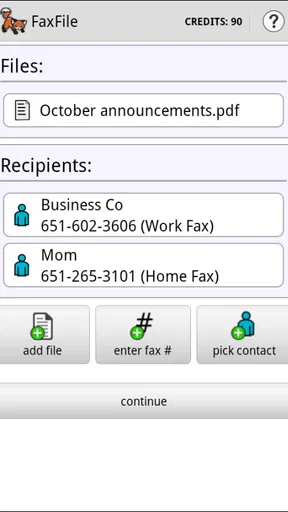
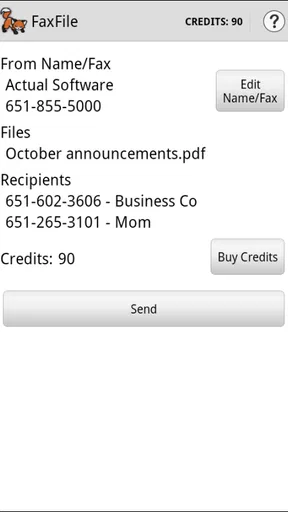
The basic process is straightforward: choose a document stored on your phone or in cloud storage, enter the destination fax number, and send it. The store description identifies PDF and Word files among the supported document types, which makes the app relevant to common forms and office paperwork. Before sending, I would still open the file and check that every page is upright, legible, and complete. A fax can transmit successfully while the document itself is hard to read.
One practical habit is to give files clear names before choosing them. If your phone contains several scans with similar names, pausing to confirm the intended file and page order can prevent a more serious mistake than a slow send. For a multi-page form, I would also review the scan at a comfortable zoom rather than assuming the preview shows every signature or small-print field clearly.
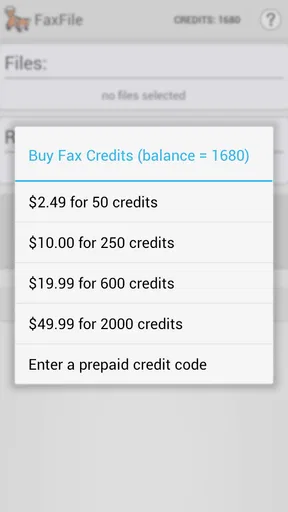
FaxFile uses credits for sending rather than requiring a recurring subscription, as described in the published article below. That arrangement can suit someone who faxes rarely: you can avoid paying every month for a service you hardly touch. The trade-off is that the cost of a particular job matters, so I would check the purchase and sending details in the app before committing, especially for a long document or an international destination.
When a phone fax is better than the alternatives
Compared with visiting a copy shop or using a workplace fax machine, a phone-based option is more convenient when the paperwork is already digital and the fax is a one-off. It can also be easier than printing a document just to feed it into a machine, then scanning or filing the paper again. That convenience is most valuable when time or travel is the main obstacle, not when you need a full document-management system.
Worth Reading Before You Choose

EA SPORTS FC Mobile 26 Is a Bigger Football Game, but It Takes Time

Flipboard Shows What News Apps Must Do Beyond the Feed

Switching to Android Auto Means Rethinking Your Driving Routine

Google Calendar Makes a Crowded Week Easier to Manage

Ludo King Makes the Most of the Minutes Between Plans

Baby Panda World Brings Quick Play to Modern Phones, but Its Game Library Feels Busy
Email is still the better choice whenever the recipient accepts it. It is usually easier to keep a sent message, attach several files, and follow the conversation in one place. A dedicated desktop fax service may make more sense for a business that sends documents regularly, needs a shared process, or wants staff to work from a consistent office setup. I would choose FaxFile when the requirement is specifically to fax and the need is occasional, rather than treating it as a reason to fax everything.
Consider a common errand: you are away from home when an office asks for a signed page before the end of the day. If the completed page is already saved on your Android phone, you can select it, enter the fax number, and handle the task without finding a printer or a public machine. I would first verify the number with the recipient, then check the page, and finally keep any delivery confirmation available until the office acknowledges receipt. That simple sequence helps separate “sent” from “the right document reached the right place.”
What occasional users should weigh
The pay-as-needed approach has a downside: credits are not the same as a predictable monthly bill, and a one-time user may need to think through the purchase before sending. If you expect to fax only once, compare the in-app cost with the time and expense of another option. If you send often, consider whether a recurring service or business-oriented fax setup would be easier to budget and manage. The right choice depends on frequency, destination, and the recipient’s requirements.
File preparation is another point worth taking seriously. A photo of a paper document may technically be convenient, but uneven lighting, shadows, folded corners, or a tilted camera can make it less readable after transmission. I would use a clean, well-lit scan when possible, check that the page edges are visible, and avoid sending a casual snapshot of a form that someone must review closely. This is not a special trick so much as the step most likely to prevent a frustrating request to resend.
There is also a privacy judgement to make. Faxing is often requested for paperwork people consider sensitive, but the fact that a document is being sent by fax does not remove the need to handle it carefully. Before selecting a file, confirm the recipient and number through a trusted source, and avoid sending unrelated pages from a larger document. If your organization has a required secure channel or a rule about where records may be sent, follow that process instead of choosing a phone app for convenience.
What its history does—and does not—tell me
FaxFile was released on April 4, 2013, so it is an established app rather than a new arrival built around a passing trend. That long presence gives the product context, but age alone is not proof of how well it handles a particular phone, file, or recipient. The useful question for a prospective user is whether its current workflow matches the occasional sending task they actually have.
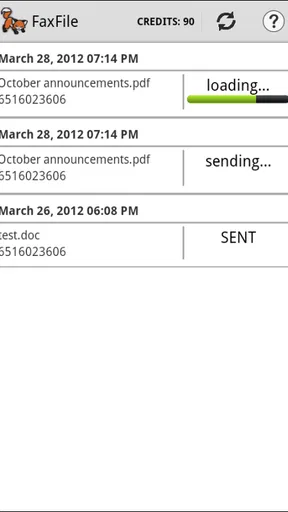
I would not infer a detailed product timeline from the release date or assume that every part of the app has changed in a particular way. For an existing user, the sensible approach is to check the version available on their device and review the current sending flow before relying on it for a deadline. For someone new, the key things to understand are the credit purchase, file selection, destination number, and how the app reports a completed send.
Who should choose it
I would point an Android user toward FaxFile if they sometimes need to fax a PDF, Word document, or phone-held paperwork and would rather not maintain a subscription for an infrequent chore. It is also a reasonable fit for someone who travels or works away from an office, provided the destination accepts fax and the document is ready to send. Its appeal is practical rather than glamorous: it turns a specific requirement into a task you can handle from the device you already carry.
I would steer a frequent sender toward comparing other options before settling on it. A workplace process or regular fax service may be more suitable when several people send documents, when tracking needs to be centralized, or when predictable costs matter more than occasional convenience. I would also skip a fax app if the recipient accepts a secure upload or email and there is no reason to use fax; the simplest valid channel is often the better one.
For me, the main recommendation is conditional: use it when fax is genuinely required, prepare the document carefully, and check the credit cost and destination before sending. The app’s free download and broad adoption make it easy to consider, while its paid items mean that “free” should not be confused with unlimited sending. Keep the recipient’s instructions in view, save the confirmation when available, and follow up if the document is time-sensitive. That is the kind of modest, focused job FaxFile is built to make less awkward.
The Setup and First Impressions
Getting started with FaxFile is a breeze. I downloaded it from the Google Play Store, and within minutes, I was ready to go. The user interface is super intuitive, which is a big win in my book. I mean, who has time to navigate a complex app these days? The layout is clean, with everything you need right at your fingertips. No clutter, just straightforward functionality.
How It Works
So, how does it work? Simple. You open the app, pick a document from your phone or cloud storage, enter the recipient's fax number, and hit send. That’s it! The beauty of FaxFile is its simplicity. Whether you're faxing a PDF, a photo, or a document from your cloud storage, the app handles it all without a hitch.
Another thing I appreciate is the app's transparency with credits. You purchase credits to send faxes, but there’s no hidden subscription trap. You buy what you need, and that’s it. For someone who faxes occasionally, this is perfect. No need to worry about monthly fees for something you might not use regularly.
Performance and Reliability
Now, let’s talk about performance. I tested FaxFile with a few different documents, and it delivered every time. The faxes were sent quickly, and I received confirmation as soon as they were delivered. It's reassuring to know that your important documents have reached their destination without any hiccups.
Moreover, the app supports international faxing, which is a huge plus if you’re dealing with clients or relatives overseas. It’s like having a global fax machine in your pocket.
Security and Privacy
Security is another crucial factor, especially when dealing with sensitive documents. FaxFile ensures that your documents are transmitted securely, which is a big relief. You can send faxes without worrying about them falling into the wrong hands, thanks to their secure transmission protocols.
Customer Support
If you run into any issues, the app’s customer support is top-notch. I reached out with a couple of questions, and they responded promptly, guiding me through the process with patience and clarity. It’s always nice to know that help is just a message away.
Why You Need It
So, why should you download FaxFile - Send Fax from phone? If you’re someone who occasionally needs to send a fax, this app is a lifesaver. It’s quick, reliable, and doesn’t require you to hunt down a physical fax machine. Plus, with the added convenience of sending faxes from anywhere, you’re no longer tied to an office.
In today’s fast-paced digital world, having an app like FaxFile on your phone is akin to carrying a Swiss Army knife. It’s versatile, dependable, and incredibly handy in a pinch. So, next time you find yourself needing to send a fax, give FaxFile a try. I promise you won't be disappointed.
Pros
- Simple and user-friendly interface.
- Supports a wide range of file formats.
- Fast processing and delivery times.
- No subscription needed for occasional use.
- Available on both Android and iOS.
Cons
- Requires in-app purchases for credits.
- No option for receiving faxes.
- Limited customer support options.
- No integration with cloud storage.
- Ads can be intrusive at times.
FAQs for FaxFile - Send Fax from phone
What types of documents can I send using FaxFile?
FaxFile supports a variety of document formats, making it versatile for different needs. You can send PDFs, images (like JPEGs and PNGs), and documents created from various applications. This flexibility ensures you can easily send faxes without needing to convert files to specific formats beforehand.
Is FaxFile secure for sending sensitive documents?
FaxFile employs encryption to protect the documents you send, ensuring your sensitive information remains secure during transmission. However, as with any digital service, it is wise to check their privacy policy and terms of service for detailed information about data protection and handling.
Do I need a subscription to use FaxFile, or are there other payment options?
FaxFile operates on a pay-per-fax basis, allowing you to purchase credits that you use to send faxes. This model means you don’t need a subscription, making it cost-effective for users who only occasionally need to send faxes. Check the app for current credit pricing.
How does FaxFile handle international faxes?
FaxFile enables sending faxes internationally, covering a wide range of countries. When sending an international fax, you must ensure the correct country code is included. It's advisable to check for any additional costs associated with international faxing, as rates may vary.
What if I encounter issues while sending a fax using FaxFile?
FaxFile provides support options within the app to assist with any issues you encounter. Common troubleshooting steps include checking your internet connection and ensuring your document is in a supported format. If problems persist, you can contact their customer support for further assistance.


